
Introduction
TDM allows you to add external data sources, enabling the display of real-time information within your presentations. TDM supports the following external data sources:
-
Facebook
-
Twitter
-
Instagram
-
Yahoo Weather
-
Office365 Calendar
-
Google Calendar
-
Flickr
-
Yammer
-
LinkedIn
-
Exchange
-
Power BI
-
NS
-
Axis (People Counter camera)
-
HIKVision (People Counter camera)
-
Amadeus
-
Realworks
This guide explains how to configure data modification for a data source. Data modification allows you to replace specific values from a data source with alternative ones.
Example:
If a data source displays the value “Mon” for Monday, you can use data modification to automatically replace “Mon” with “Monday.”
Requirements
To configure data modification, you need:
-
Administrator access to the TDM Designer
How to Configure Data Modification for Your Data Source
-
Log in to the TDM Designer with an administrator account:
https://designer.tdmsignage.com -
Open the Config Panel.

-
Select the tab called External Data.
-
Locate your data source and click the magnifying glass icon in front of it.

-
A pop-up window will open.
Here, you can define which values you want to replace.Example:
Replace the value “Apr” with “April” in the OpenWeather data source.Once the replacement values are entered, click the + icon to add them.
You can define multiple replacements for a single data source..png?width=670&height=261&name=mceclip3%20(1).png)
-
Please note that it may take up to 5 minutes for changes to take effect, as TDM caches data source information.
Old value:-1.png?width=198&height=86&name=mceclip4%20(1)-1.png)
New value: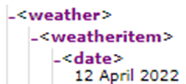
You have successfully configured data modification.
Repeat these steps if you want to modify additional values in your data sources.