
Introduction
TDM allows you to add external data sources that display real-time information within your presentations.
TDM supports the following external data sources:
-
Facebook
-
Twitter
-
Instagram
-
Yahoo Weather
-
Office 365 Calendar
-
Google Calendar
-
Flickr
-
Yammer
-
LinkedIn
-
Exchange
-
Power BI
-
NS
-
Axis (People Counter camera)
-
HikVision (People Counter camera)
-
Amadeus
-
Realworks
This guide explains how to set up a Flickr data source in TDM.
Requirements
To set up a Flickr data source, you need:
-
Administrator access to the TDM Designer
How to Set Up a Flickr Data Source
-
Log in to the TDM Designer using an administrator account:
https://designer.tdmsignage.com -
Select “Config Panel” from the left-hand menu.

-
Open the “External Data” tab.
-
Click the “+” button on the right-hand side to create a new data source.

-
In the pop-up window, enter a name for your data source and select “Flickr.”
Once selected, click “Next.”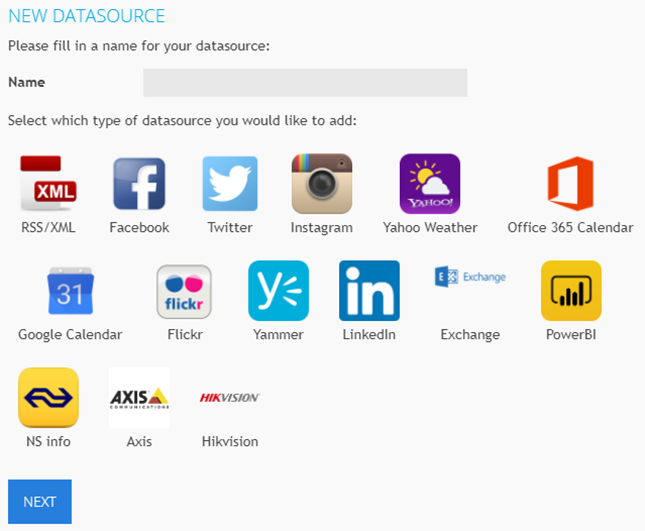
-
In the next window, choose either an account or a hashtag you want to use for your Flickr data source.
-
You can also enable the option “All tags in 1 picture.”
All tags in 1 picture:
Enable this option if you want to show only the pictures that match all your specified tags or search words.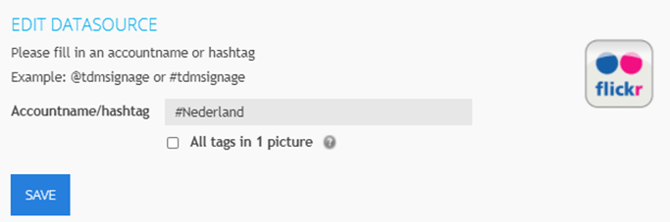
Once you have configured the settings, click “Save” to create your Flickr data source.
-
-
To verify your setup, click the eye icon in front of your new data source to preview the retrieved Flickr information.

You have now successfully created a Flickr data source in TDM.
You can use this source to display live Flickr images and media within your digital signage presentations.