
Introduction
With TDM Digital Signage, you have the ability to turn on or off your Sony and Philips Android devices directly from the Designer. This manual explains which configurations are needed on the device and how to create schedules in the Designer.
Requirements
If you want to configure TV scheduling for your device, you need to meet the following requirements:
-
Have administrator access to the TDM Designer
-
Have access to the settings of your Sony or Philips Android device
How To Set Up TV Scheduling
How to Configure the Sony Bravia for TV Scheduling
-
Enter Hotel / Pro mode using the following button sequence on your remote:
i+ / Mute / Vol+ / Home -
Go to Settings > Network > Home Network Setup.
-
Select IP Control.
-
Set Authentication to None.
-
Set Simple IP Control to On.
-
Go to Pro Settings.
-
Open Developer Options.
-
Enable Power state control by apps.
-
Start Pro Mode.
How to Configure the Philips D-Line (Android 7 and Above) for TV Scheduling
-
Press Home on your remote.
-
Navigate to Advanced Options → Power Save → Enable Mode 4.
How to Create TV Schedules in the Designer
-
Log in to the Designer with an administrator account: https://designer.tdmsignage.com
-
Select Player Overview.
-
Select the player you want to configure for TV Scheduling.

-
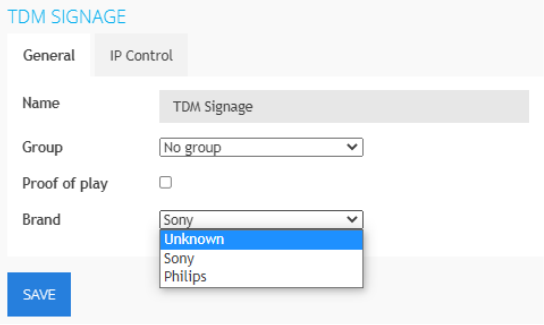
Make sure that the brand for the device is configured correctly.
-
Next, select Config Panel.
-3.png?width=105&height=108&name=mceclip0%20(1)-3.png)
-
Open the tab called TV Scheduling.
-
Click the “+” button to create a new schedule.

-
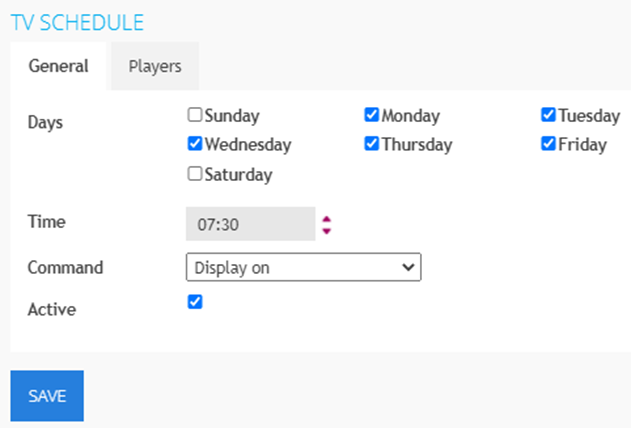
A pop-up will appear — configure the following fields:
-
Days: Select the days on which you want the schedule to run
-
Time: Enter the time when the schedule should be executed
-
Command: Select the command you want to execute
-
Active: Tick this option to activate the schedule (leave unticked to keep it inactive)
-
Players: In the Players tab, assign the players to this schedule
-
-
Once all options are configured, select Save.
Repeat these steps if you want to create multiple schedules.
Please note that the TDM Android application checks every five minutes for any new or updated TV schedules.