
Introduction
TDM Digital Signage supports the use of Windows-based devices, which can be used to display signage content created within the Designer. When a new version of TDM is released, it usually includes an updated version of the PC Player software as well.
This guide explains how to update the TDM PC Player directly from the Designer.
Requirements
If you want to update the PC Player software, you need to meet the following requirements:
-
Have administrator access to the TDM Designer
How To Update the PC Player from the Designer
The PC Player software can be updated individually for each device, allowing you to choose which players to update.
-
Log in to the Designer with an administrator account:
https://designer.tdmsignage.com -
From the Dashboard, select Player Overview.

-
Locate the player you want to update and click on its name.

-
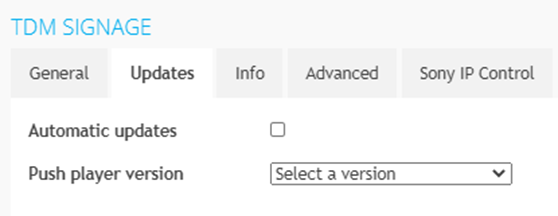
In the pop-up window that appears, open the tab called Updates. Push the latest version of the PC Player to your device by selecting Update.
If you want the player to update automatically in the future, tick the Automatic Updates checkbox.
Repeat these steps for any additional devices you wish to update.