Introduction
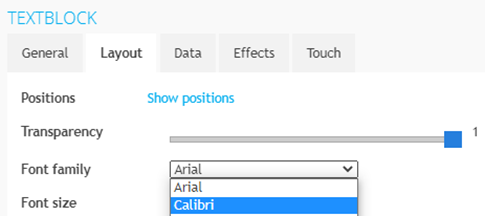
With TDM Digital Signage, you have the ability to upload your own custom fonts. The fonts uploaded into the Designer can then be used within your template designs.
Requirements
If you want to upload custom fonts, you need to meet the following requirements:
-
Have administrator access to the TDM Designer
-
Have a .ttf or .otf file of the font you want to upload
How To Upload Custom Fonts
-
Log in to the Designer: https://designer.tdmsignage.com
-
Select “Config Panel.”
-3.png?width=105&height=108&name=mceclip0%20(1)-3.png)
-
Select the tab called “Upload Fonts.”
.png?width=159&height=52&name=mceclip1%20(2).png)
-
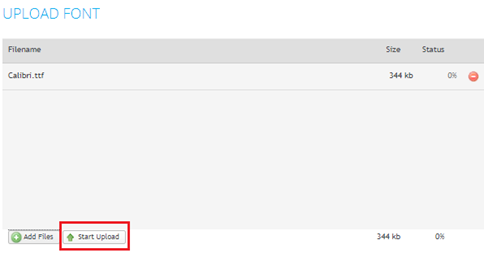
Click “Add files” to upload your custom fonts. Make sure to upload a .ttf or .otf file.
-3.png?width=493&height=267&name=mceclip2%20(1)-3.png)
-
Once you have selected your fonts, click “Start Upload.”
-
After the upload has completed successfully, refresh the page by pressing F5. The font should now be visible on the page.

-
The font is now ready to use within your template designs.