Introduction
TDM Digital Signage software keeps track of all changes made within the platform. It logs exactly what was changed, added, or removed — by whom and when. With the filter options, you can track changes made by specific users or to specific content.
The Content Log is available through Administration → Content Log.
This guide explains the available options for using the Content Log.
Requirements
If you want to use the Content Log, you need to meet the following requirements:
-
Have administrator access to the TDM Designer
How To Use the Content Log
-
Log in to the Designer with an administrator account: https://designer.tdmsignage.com
-
Select Administration → Content Log.
-1.png?width=344&height=334&name=mceclip0%20(2)-1.png)
-
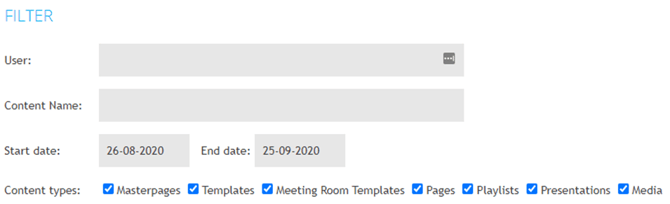
The page that opens is the default overview of the Content Log. From here, you have several options:
-
Filter by user: Displays the changes made by a specific user.
-
Filter by content name: Displays the changes made to all content containing the specified name.
-
Filter by timeframe: Displays the changes made within a specific timeframe.
-
Filter by content type: Displays only changes made to the selected content type. For example, if you select “Masterpages,” you will only see changes made to masterpages.